
ProLiant BL e-Class C-GbE Interconnect Switch Web-based Interface Reference Guide

Configuring the Switch Modules using the Web-based Interface
To display and configure basic switch module information:
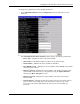
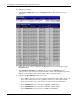
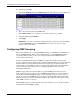
1. Select Switch Information from the Configuration menu. The following screen is
displayed.
The Switch Information (Basic Settings) window displays the following information:
— Device Type—Displays the name of the switch module.
— MAC Address—Identifies the Ethernet address for the switch module.
— Serial Number—Identifies the switch module serial number.
— Boot PROM Version— Identifies the version number of Boot PROM code installed
on the interconnect switch.
— Firmware Version—Identifies the version number of the firmware installed on the
switch module. This information can be updated by using the Update Firmware
window in the Reset and Update section.
— Hardware Version—Identifies the version number of the interconnect switch
hardware build.
— System Up Time— Identifies the time the switch booted up, if the current time has
been set on the switch module. If the current time has never been set up on the
interconnect switch, this field identifies the time since the switch module was
booted up.
HP ProLiant BL e-Class C-GbE Interconnect Switch Web-based Interface Reference Guide 2-7