
ProLiant BL e-Class C-GbE Interconnect Switch Web-based Interface Reference Guide

Configuring the Switch Modules using the Web-based Interface
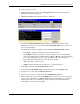
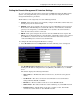
— VID—The VLAN ID (VID) number for the switch management port
2. Select Manual, BOOTP, or DHCP in the Get IP From field:
— If you select Manual, type the IP Address, Subnet Mask, and Default Gateway of
the switch module.
— If you select BOOTP, you do not need to configure any IP parameters because a
BOOTP server automatically assigns IP configuration parameters to the GbE
Interconnect Switch.
— If you select DHCP, you do not need to configure any IP parameters because a
DHCP server automatically assigns IP configuration parameters to the GbE
Interconnect Switch.
3. Type the VLAN ID for the switch management port in the VID field.
4. Click Apply to activate the new settings.
IMPORTANT: To save the configuration settings permanently, you must enter them into NVRAM
using the Save Changes option on the Maintenance menu. Refer to the section, “Saving
Changes,” earlier in this chapter.
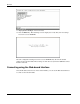
Displaying Basic Switch Module Information
You can quickly and easily obtain basic information about the switch module including: the
type of switch and the MAC address (assigned by the factory and unchangeable) for that
switch module. In addition, the boot PROM and firmware version numbers are displayed.
This information is helpful in monitoring PROM and firmware updates.
2-6 HP ProLiant BL e-Class C-GbE Interconnect Switch Web-based Interface Reference Guide
HM