
ProLiant BL e-Class C-GbE Interconnect Switch Web-based Interface Reference Guide

Configuring the Switch Modules using the Web-based Interface
Setting the Remote Management IP Interface Settings
To access and manage the interconnect switch from an SNMP-based Network Management
System, or by using the Telnet protocol or the Web, you must first configure the remote
management IP interface parameters.
The IP address can be assigned by one of the following methods:
•
•
•
Manual—This option allows you to manually configure an IP address, subnet mask, and
default gateway for the switch module.
BOOTP—This option configures the switch to send out a BOOTP broadcast request for
IP information. The BOOTP protocol allows IP addresses, network masks, and default
gateways to be assigned by a central BOOTP server attached to the same network to
which the interconnect switch is connected.
DHCP—This option configures the switch to send out a DHCP broadcast request. The
DHCP protocol allows IP addresses, network masks, and default gateways to be assigned
by a DHCP server attached to the same network to which the interconnect switch is
connected. DHCP protocol is the factory default mode.
To configure the remote management IP interface settings:
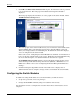
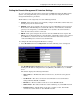
1. Select IP Address from the Configuration menu. The following screen is displayed.
The TCP/IP Parameters Setup window is used to determine whether the switch module
should get its IP address settings from the user (Manual), a BOOTP server, or a DHCP
server.
The window displays the following information:
— MAC Address—The Ethernet address for the device, also known as the physical
address
— Get IP From—The choices for how the switch module receives its IP address
settings: Manual, BOOTP, and DHCP
— IP Address—The host address for the device on the TCP/IP network
— Subnet Mask—The address mask that controls subnetting on your TCP/IP network
— Default Gateway—The IP address of the device, usually a router, that handles
connections to other subnets or other TCP/IP networks
HP ProLiant BL e-Class C-GbE Interconnect Switch Web-based Interface Reference Guide 2-5