
ProLiant BL e-Class C-GbE Interconnect Switch Web-based Interface Reference Guide

Overview
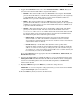
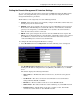
7. Toggle the Get IP From field to select from Manual, BOOTP, or DHCP. This action
selects how the switch module will be assigned an IP address.
— BOOTP—The switch module sends out a BOOTP broadcast request. The BOOTP
protocol allows IP addresses, network masks, and default gateways to be assigned by
a central BOOTP server. If this option is set, the switch module first looks for a
BOOTP server to provide it with this information.
— DHCP—The switch module sends out a DHCP broadcast request. The DHCP
protocol allows IP addresses, network masks, and default gateways to be assigned by
a DHCP server. If this option is set, the switch module first looks for a DHCP server
to provide it with this information.
— Manual—This option allows the entry of an IP address, subnet mask, and default
gateway for the switch module. The data in these fields should be of the form
xxx.xxx.xxx.xxx, where each xxx is a number between 0 and 255. This address should
be a unique address on the network assigned for use by the Network Administrator.
The fields that require entries under this option include:
— Subnet Mask—A Bitmask that determines the extent of the subnet that the
switch module is on. The value should be 255.0.0.0 for a Class A network,
255.255.0.0 for a Class B network, and 255.255.255.0 for a Class C network, but
custom subnet masks are allowed.
— Default Gateway—An IP address that determines where packets with a
destination address outside the current subnet should be sent. This is usually the
address of a router or a host acting as an IP gateway. If your network is not part
of an intranet, or you do not want the switch module to be accessible outside your
local network, you can leave this field blank.
If you select Manual, type the appropriate data into the IP Address, Subnet Mask, and
Default Gateway fields.
8. Type the VLAN ID (VID) of a VLAN that will have access to the Telnet manager in the
Management VID field. This ID will be the VID of the VLAN on which a management
station is located. Management of the switch module using Telnet or SNMP will be
isolated to this VLAN.
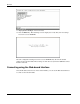
9. Highlight APPLY and press the Enter key to make the change effective.
IMPORTANT: To save the configuration settings permanently, you must enter them into NVRAM
using the Save Changes option on the main menu.
10. Press the ESC key until you return to the main menu.
HP ProLiant BL e-Class C-GbE Interconnect Switch Web-based Interface Reference Guide 1-5