
ProLiant BL e-Class C-GbE Interconnect Switch Web-based Interface Reference Guide

Overview
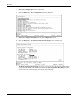
3. Highlight Configuration on the main menu.
4. Press the Enter key. The Configuration menu is displayed.
5. Highlight Configure IP Address from the Configuration menu.
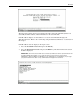
6. Press the Enter key. The Remote Management Setup screen is displayed.
The Remote Management Setup screen lets you specify how the switch module will be
assigned an IP address. The fields listed under the Current Switch IP Settings heading
are those that are currently being used by the switch module.
1-4 HP ProLiant BL e-Class C-GbE Interconnect Switch Web-based Interface Reference Guide