
ProLiant BL e-Class C-GbE Interconnect Switch Command Line Interface Reference Guide

Configuring the Switch Modules using the Command Line Interface
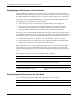
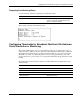
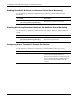
Enabling Broadcast, Multicast, or Unknown Packet Storm Monitoring
Use the following command to enable broadcast, multicast, and DA-unknown storm
monitoring:
Command Description
monitor-storm enable
{ [broadcast] [multicast] [unknown] }
Enables monitoring of broadcast, multicast, or
DA-unknown packet storm monitoring
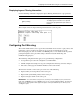
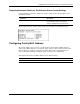
Disabling Monitoring Broadcast, Multicast, DA-Unknown Storm Monitoring
Use the following command to disable monitoring broadcast, multicast, and DA-unknown
storms:
Command Description
monitor-storm disable
{ [broadcast] [multicast] [unknown] }
Disables monitoring of broadcast, multicast, or
DA-unknown packet storms
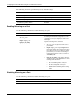
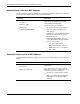
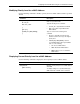
Configuring Storm Threshold in Packets Per Second
Use the following command to configure the storm threshold in packets per second:
Command Description
monitor-storm set threshold <threshold>
Sets threshold (in packets per second) to drop
packets when broadcast, multicast, or
DA-unknown packet rate exceeds this threshold
Type a number between 0 and 262143 packets
per second. The default is 500 packets per
second.
2-74 HP ProLiant BL e-Class C-GbE Interconnect Switch Command Line Interface Reference Guide