
ProLiant BL e-Class C-GbE Interconnect Switch Command Line Interface Reference Guide

Configuring the Switch Modules using the Command Line Interface
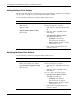
Deleting Multicast Filter Actions
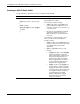
Use the following command to delete multicast filter actions:
Command Description
multicast delete
vlan <vlan_id>
mac { <mac_addr> | all }
Delete multicast filter actions for one or all MAC
addresses on a VLAN
Type the following in the command:
• vlan <vlan_id>—Type vlan and the VLAN
ID.
• mac {<mac_addr> | all}—Type mac and
one of the following:
• <mac_addr>—Type the MAC address
of the VLAN on which you want to
delete the multicast filter actions.
• all—Type all to delete multicast filter
actions on all MAC addresses.
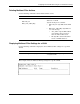
Displaying Multicast Filter Settings for a VLAN
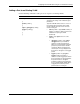
Use the following command to display the current multicast filter settings for a specified
VLAN:
Command Description
multicast show [vlan <vlan_id>]
Displays multicast filtering settings for all VLANs
or a specific VLAN
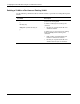
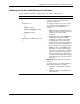
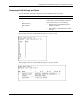
This example shows the multicast filtering settings for a specific VLAN.
HP ProLiant BL e-Class C-GbE Interconnect Switch Command Line Interface Reference Guide 2-61