
ProLiant BL e-Class C-GbE Interconnect Switch Command Line Interface Reference Guide

Configuring the Switch Modules using the Command Line Interface
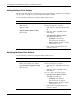
Adding Multicast Filter Actions
The switch module supports forwarding control for group addresses. Packets are forwarded to
specific ports of a group for a specific multicast destination address.
Use the following command to configure multicast filter actions:
Command Description
multicast add
vlan <vlan_id>
mac <mac_addr>
type {permanent | delete-on-reset}
port <portlist>
Enables multicast filter actions
Type the following in the command:
• vlan <vlan_id>—Type vlan and the VLAN
ID.
• mac <mac_addr>—Type mac and the
MAC address.
• type {permanent | delete-on-reset}—
Type type and the filter type.
• permanent—The filter stays
permanently until reconfigured.
• delete-on-reset—The filter is deleted
when the port is reset.
• port <portlist>—Type port and the port
number or numbers.
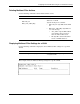
Modifying Multicast Filter Actions
Use the following command to configure multicast filter actions:
Command Description
multicast modify
[vlan <vlan_id> | mac <mac_addr>]
[ type {permanent | delete-on-reset} |
port <portlist>]
Modifies multicast filter actions
Type the following in the command:
• vlan <vlan_id>—Type vlan and the VLAN
ID.
• mac <mac_addr>—Type mac and the
MAC address.
Type one or both of the following options:
• type {permanent | delete-on-reset}—
Type type and the filter type.
• permanent—The filter stays
permanently until reconfigured.
• delete-on-reset—The filter is deleted
when the port is reset.
• port <portlist>—Type port and the port
number or numbers.
2-60 HP ProLiant BL e-Class C-GbE Interconnect Switch Command Line Interface Reference Guide