
ProLiant BL e-Class C-GbE Interconnect Switch Command Line Interface Reference Guide

Configuring the Switch Modules using the Command Line Interface
Enabling STP
Spanning Tree Protocol (STP) can be enabled or disabled at the switch level. Only one
spanning tree domain per switch module is supported. You can configure ports to participate
in that spanning tree domain, by enabling or disabling the STP function on a per port basis.
Ports can also be configured in STP bypass mode (fast forward mode) that allows the port to
skip the initial STP states (listening and learning) before enabling it in the forwarding state.
IMPORTANT: The switch module supports mono-Spanning Tree Protocol. Multiple spanning tree
domains are not supported. This means the Spanning Tree Algorithm makes calculations without
considering the VLAN domains to which the ports belong. All ports that have STP enabled fall under
one STP domain.
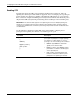
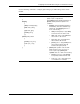
Use the following command to enable STP on the switch module, configure ports to
participate in the spanning tree domain, or to enable bypass on a port.
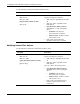
Command Description
stp enable
{
feature |
bypass <portlist> |
port <portlist>
}
Enables STP on the switch module, enables a
port or ports to particpate in a single spanning
tree domain, or enables bypass on a port or
ports Type one of the following in the command:
• feature—Type feature to enable STP
globally for the switch module.
• bypass <portlist>—Type bypass and the
port number or numbers to enable bypass
on the specified ports.
• port <portlist>—Type port and the port
number or numbers to enable the port to
participate in the spanning tree domain.
2-52 HP ProLiant BL e-Class C-GbE Interconnect Switch Command Line Interface Reference Guide