
ProLiant BL e-Class C-GbE Interconnect Switch Command Line Interface Reference Guide

Configuring the Switch Modules using the Command Line Interface
Modifying Ingress and Egress Bandwidth Parameters
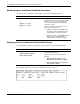
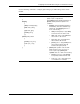
Use the following command to modify ingress and egress bandwidth parameters:
Command Description
bandwidth modify port <portlist>
{
[ingress <bw_units>]
[egress <bw_units>]
}
Modifies a port to the restart ingress or egress
bandwidth table and configures the bandwidth
between 1 and 127 units of 117 Kbytes per
second. Zero (0) means disable bandwidth
control after restart.
Type the port number or numbers and one or
both of the following options:
• ingress <bw_units>—Type ingress and
the number of ingress bandwidth units. A
number between 1 and 127 is allowed.
• egress <bw_units>—Type ingress and the
number of egress bandwidth units. A
number between 1 and 127 is allowed.
Displaying Current and Restart Port Bandwidth Settings
Use the following command to display the current and restart port bandwidth settings:
Command Description
bandwidth show port <portlist>
direction {ingress | egress}
type {current | restart}
Displays the current and restart port ingress or
egress bandwidth settings
Type the port number or numbers and the
following.
• direction {ingress | egress}—Type
direction and either ingress or egress.
• type {current | restart}—Type type and
either current or restart.
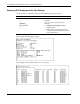
This example shows the restart ingress bandwidth settings for one port.
2-50 HP ProLiant BL e-Class C-GbE Interconnect Switch Command Line Interface Reference Guide