
ProLiant BL e-Class C-GbE Interconnect Switch Command Line Interface Reference Guide

Configuring the Switch Modules using the Command Line Interface
Configuring Backpressure Flow Control
Backpressure can be enabled to initiate flow control on the switch module ports. When
backpressure is enabled and there is incoming traffic congestion on a port, the receiving port
sends a request to the transmitting port. The transmitting port acknowledges the request and
stops sending packets for a random amount of time, before starting to send again.
The following shows the factory default setting for backpressure flow:
Feature Default Value
Backpressure Disabled
Enabling Backpressure Flow Control
Use the following command to enable backpressure flow control:
Command Description
backpressure enable
Enables backpressure flow control on the switch
module
Disabling Backpressure Flow Control
Use the following command to disable backpressure flow control:
Command Description
backpressure disable
Disables backpressure flow control on the
switch module
Displaying Backpressure Flow Control Settings
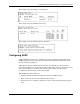
Use the following command to display backpressure flow control:
Command Description
backpressure show
Displays backpressure flow control settings
For example:
HP ProLiant BL e-Class C-GbE Interconnect Switch Command Line Interface Reference Guide 2-37