
ProLiant BL e-Class C-GbE Interconnect Switch Command Line Interface Reference Guide

Configuring the Switch Modules using the Command Line Interface
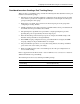
Considerations when Creating a Port Trunking Group
When creating a port trunking group, consider the following rules that determine how the port
trunk reacts in network topology:
•
•
•
•
•
•
•
•
The first port of the port trunk is implicitly configured to be the master logical port. This
is the reference port used in configuration commands. It can be thought of as the logical
port representing the entire group.
When using a port trunk, always reference the master logical port of the group when
configuring or viewing VLANs.
VLANs configured to use other ports in the port trunk will have those ports deleted from
the VLAN when the port trunk becomes enabled.
The Spanning Tree algorithm views port trunk as a single Spanning Tree port. The
Spanning Tree port is represented by the master logical port.
If the VLAN settings of the master logical port are changed, the VLAN settings of all
members of that port trunk are changed similarly.
If the IGMP snooping configuration for any port trunk member is changed, the IGMP
snooping settings for all port trunk members are changed.
The port trunk takes precedence over any other setting. That is, the settings of trunked
ports are the same as the master port settings.
When any trunked port becomes a non-trunked port, all of the port configurations are
reset to default settings.
Refer to Appendix G in the HP ProLiant e-Class C-GbE Interconnect Switch User Guide for
additional information on port trunking.
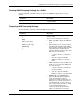
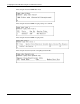
The following shows the factory default port trunking settings:
Feature Default Value
Port Trunking Xconnect (Port 21–22)
Trunk Load-Sharing Algorithm Source MAC Address
HP ProLiant BL e-Class C-GbE Interconnect Switch Command Line Interface Reference Guide 2-29