
ProLiant BL e-Class C-GbE Interconnect Switch Command Line Interface Reference Guide

Configuring the Switch Modules using the Command Line Interface
Configuring Basic Switch Module Information
This section describes how to configure basic switch information.
Setting System Name, Location, and Contact Information
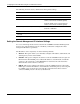
The following shows the factory default settings for system name, system location, and
system contact:
Feature Default Value
System Name None
System Location None
System Contact None
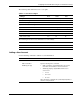
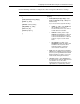
Use the following command to configure the system name, location, and contact information:
Command Description
system set
{
[sysname <system_name>]
[sysloc <system_location>]
[contact <system_contact >]
}
Configures system information
Enter the following in the command:
• sysname <system_name>—Type
sysname and a system name. The
system name can be up to 255
characters in length. Blank spaces are
allowed.
• sysloc <system_location>—Type
sysloc and the system location. The
system location can be up to 255
characters in length. Blank spaces
are allowed.
• contact <system_contact >—Type
contact and the name of the contact
person. HP recommends entering the
name of the person who is responsible
for the maintenance of the network
system on which the switch module is
located. The contact name can be up
to 255 characters in length. White
spaces are allowed.
Displaying Switch Module Information
You can display basic information about the switch module including the type of switch and
the MAC address (assigned by the factory and unchangeable) for that switch module. In
addition, the boot PROM and firmware version numbers display. This information is helpful
in monitoring PROM and firmware updates.
HP ProLiant BL e-Class C-GbE Interconnect Switch Command Line Interface Reference Guide 2-9