
ProLiant BL e-Class C-GbE Interconnect Switch Command Line Interface Reference Guide

Configuring the Switch Modules using the Command Line Interface
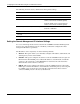
Use the following command to configure the remote management IP interface settings:
Command Description
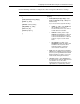
mgmt-if set
{
[mode {manual | bootp | dhcp}]
[ipaddr <ip_addr>]
[netmask <subnet_mask>]
[def-gateway <ip_addr>]
[mvid <vlan_id>]
[secure-ip <iplist> ]
}
Sets the remote management parameters
including:
• mode {manual | bootp | dhcp}—Type
mode and manual, bootp, or dhcp. The
default is dhcp.
If you choose manual, type the following:
• ipaddr <ip_addr>—Type ipaddr and
the IP address in the form of
xxx.xxx.xxx.xxx, where each xxx is a
number between 0 and 255.
• netmask <subnet_mask>—Type
netmask and 255.0.0.0 for a Class A
network, 255.255.0.0 for a Class B
network, 255.255.255.0 for a Class C
network, or type a custom subnet
mask.
• def_gateway <ip_addr>—Type
def-gateway and the IP address that
determines where packets with a
destination address outside the
current subnet should be sent.
• mvid <vlan_id>—Management VLAN ID
(MVID) is the VLAN ID of the management
processor port. Type mvid and the VLAN
ID through which you want to access the
switch module management interface.
• secure-ip <iplist>—Type secure-ip and
the management station IP addresses that
are allowed to access the switch
management interface. Enter from one to
eight addresses, separated by commas.
HP ProLiant BL e-Class C-GbE Interconnect Switch Command Line Interface Reference Guide 2-7