
ProLiant BL e-Class C-GbE Interconnect Switch Command Line Interface Reference Guide

Overview
1-12 HP ProLiant BL e-Class C-GbE Interconnect Switch Command Line Interface Reference Guide
Paging of Data Output
You can configure the switch module to display one page of data at a time. This is helpful
when you are in a Telnet session and are using the show commands to display information
about the switch module.
Paging is on with every new CLI session. To avoid the paging prompts when using scripts,
set paging to off.
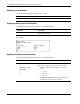
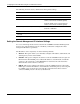
Use the following command to set the paging option:
Command Description
paging {on | off}
Configures the switch to display one page of data at a time
If paging is turned off, data will display continuously until the
end of the data is reached.
Configuring the Switch Modules
After logging on to the interconnect switch for the first time, perform the following tasks for
each switch module:
1. Configure the IP address
2. Set up users, passwords, and access privileges
3. Change default SNMP community strings for read/write and read-only
For information on how to configure these and other interconnect switch features, refer to
Chapter 2.
NOTE: After configuring the IP address on the switch module, the switch module can be accessed
using Telnet, SNMP, or a Web browser. Refer to the section, “Configuring the Remote Management IP
Interface Settings,” in Chapter 2 for information on how to set up the IP address.