
ProLiant BL e-Class C-GbE Interconnect Switch Command Line Interface Reference Guide

Configuring the Switch Modules using the Command Line Interface
Adding SNMP Management Interface Community Strings
SNMP allows up to four community names to be defined. The community names “public”
and “private” are defined by default. You can change the names in addition to adding others.
You must coordinate these names with the community name settings you use in your network
management system.
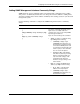
Use the following command to configure the SNMP management interface community
strings:
Command Description
snmp add
{
string community <string> access {ro | rw}]
|
trap ip <ip_addr> community <string>
}
Configures the SNMP interface with up to
four sets of community strings with access
rights and access validity status and
configures up to four (one at a time) SNMP
trap manager IP addresses
Type one of the following in the command:
• string —To define a community string,
type string and the following:
• community <string>—Type
community and a string from 1 to
20 characters in length. This string
is included on SNMP packets sent
to and from the switch module. Any
station not privy to this community
does not receive the packet.
• access {ro | rw}—Type access
and either ro (read only), meaning
that the community member can
only view switch settings, or rw
(read-write) which allows the
member to change settings on the
switch module.
• trap—To configure an SNMP trap IP
address, type trap and the following:
• ip <ip_addr>— Type ip and IP
address of the trap recipient.
• community <string>—Type
community and a string from 1 to
20 characters in length.
HP ProLiant BL e-Class C-GbE Interconnect Switch Command Line Interface Reference Guide 2-81