
WESM zl 12 and 48 Radio-Port License Installation Guide 2007-07


15
3
ProCurve Manager Method
ProCurve Manager (PCM), version 2.1 or later with the
auto-update made available 1 April 2006 or later,
supports these license functions:
O Installing a license
O Uninstalling a license
PCM is software for managing your ProCurve network.
The standard version is available at no charge; in
addition, ProCurve Manager Plus (PCM+) is an
enhanced version of the software available for purchase.
Both PCM and PCM+ support the license functions.
The instructions below apply to both PCM and PCM+.
Setting up PCM/PCM+
If you don’t have PCM (or PCM+) installed on your
system, you can install it from the software CD-ROM
that is included with your radio-port license.
Alternatively, you can download PCM from the
ProCurve Web site (http://www.procurve.com).
To install PCM and set it up for managing your licenses,
do the following:
1. Follow the instructions on the CD-ROM or on the
ProCurve Web site for installing PCM.
2. Start PCM.
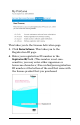
3. Select Tools > Preferences.
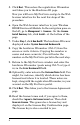
4. Select Global > Automatic Updates.