
Interoperability between ProCurve WESM zl and Avaya 3631 IP Wireless Telephone





Interoperability between ProCurve WESM zl and Avaya 3631 wireless phone
HP ProCurve Networking
7
To enable self-healing:
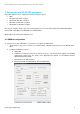
1. From the Special Features > Self Healing > Configuration tab, check the Enable Neighbor Recovery box, then
click Apply.
2. Then from the Neighbor Details tab click Detect Neighbors.
3. You can now edit an RP radio to check that the other radios with same 802.11 mode (a or b/g) have been
listed as neighbors.
5.3 Test roaming time
You can determine the roaming time by first using the WESM to determine the radio port to which the phone is
associated. To test roaming time:
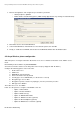
1. From Device Association > Wireless Stations, note the radio’s Station Index.
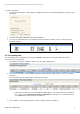
2. Go to Device Association > Radio Adoption Statistics and determine the MAC address of the corresponding
radio port.
Here for Radio index 3 the MAC address is 00-14-C2-A0-1B-3B
o To determine the switch port associated with this MAC address, use ProCurve Manager’s Find Node
tool, use the command show lldp info remote all on the switch if the radio ports are connected at layer 2,
or use show arp if the radio ports have IP addresses.
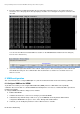
3. From a machine on the network launch a continuous ping to the phone IP address.