
Interoperability between ProCurve WESM zl and Avaya 3631 IP Wireless Telephone





Interoperability between ProCurve WESM zl and Avaya 3631 wireless phone
HP ProCurve Networking
6
o Option 59: DHCP lease rebind time (optional)
o Option 66: TFTP Server
These options are similar to the ones used for wired phones.
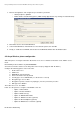
Or enter the network address statically:
12. DHCP: Off ( it is On by default, so you have to disable it)
13. Phone IP address: 10.1.10.100
14. Subnet mask: 255.255.255.0
15. Default gateway: 10.1.10.1
16. DNS Servers: 10.3.156.11
Then click on back. The phone tries to find the access points, then either looks for the DHCP or checks the IP
configuration, then tries to connect to a file server to search for a configuration upgrade, then looks for the call server.
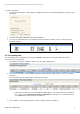
Once its IP address has been allocated or verified, it is possible to see its association to the voice WLAN on the
WESMzl, in Device Association > Wireless stations. You can view the MAC address, IP address, WLAN, VLAN, and
Radio Index.
5. Fast roaming
Layer 2 roaming occurs when a phone that was associated to a radio port moves to another radio port adopted by the
same WESM. The phone remains in the same VLAN.
Layer 3 roaming happens when a phone moves between two radio ports associated to different WESM modules. The
voice WLAN is associated with different VLANs (and subnets) on the two modules. In this case, the phone keeps its
originating IP address but the voice flow is tunneled by the current module to the home module.
For more information on L2/L3 roaming configurations, please refer to ProCurve Application Note AN-M3, How to
configure L2 and L3 wireless roaming.
5.1 Configure self-healing
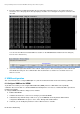
The self-healing feature enables associating neighbors to each radio port. In case of failure of a radio port, the
neighbors increase their transmit power to provide coverage and compensate for the failed RP. You can also enable
interference avoidance, which causes radios to change their channel settings to avoid interfering with surrounding
radios.