
Interoperability between ProCurve WESM zl and Avaya 3631 IP Wireless Telephone





Interoperability between ProCurve WESM zl and Avaya 3631 wireless phone
HP ProCurve Networking
5
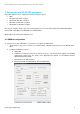
3. Click the Config button, and configure the pre-shared key as follows.
o ASCII passphrase: procurve
o Enable all three Fast Roaming options (PMK caching, Opportunistic key caching, Pre-authentication).
4. Click OK to return to the main Edit window.
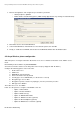
5. In the main Edit window, under Advanced, select Closed System, then click OK.
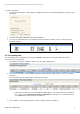
6. Finally, to enable the new WLAN, at the bottom of the WLAN list window click the Enable button.
4.2 Avaya Wireless phone configuration
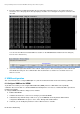
Switch the phone on using the red button. At the first screen, choose “Advanced” and then select “Admin” access
mode.
Enter Admin password, which is by default 00000000.
Select Access Profiles and choose the first profile on the list ( they all appear with “No Name”).
Configure the following options on the next menu:
1. Profile name: voice
2. SSID: voice
3. WMM Mode: leave by default
4. Power save Mode: leave by default
5. Security type: choose WPA2-PSK ( use the arrows to select it)
6. Encryption type: choose AES
7. Encryption key: First select the key input type ( here Asc) and enter “procurve”.
8. EAP type: leave Disable
Then either choose 12- Use DHCP
In this case the options to configure on the DHCP server are:
o Option 1: Subnet Mask
o Option 3: Router IP Address
o Option 6: DNS Server(s)
o Option 15: DNS Domain Name
o Option 51: DHCP Lease time (optional)
o Option 52: Overload Option (optional)
o Option 58: DHCP lease renew time (optional)