
Interoperability between ProCurve WESM zl and Avaya 3631 IP Wireless Telephone





Interoperability between ProCurve WESM zl and Avaya 3631 wireless phone
HP ProCurve Networking
4
4. Secure wireless WPA2-PSK encryption
Avaya 3631 Wireless Phone support the following encryption options:
• WEP
• WPA-PSK with TKIP encryption
• WPA2-PSK with AES encryption
• WPA-802.1X with TKIP encryption
• WPA2-802.1X with AES encryption
These last 2 encryption modes support the following EAP protocols: TLS, LEAP, PEAP-GTC, PEAP-MSCHAPv2,
TTLS-CHAP, TTLS-MD5, TTLS-MSCHAP, TTLS-MSCHAPv2
WPA2-PSK is described in this application note.
4.1 WESM zl configuration
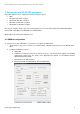
To configure the ProCurve WESM for secure wireless encryption via WPA2-PSK:
1. On the wireless edge services module, go to Network Setup > WLAN Setup and create a new WLAN called
voice.
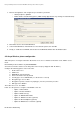
2. Configure this WLAN as follows:
a. SSID: voice
b. VLAN ID: The VLAN you want to be assigned to the phone. This VLAN must be tagged on the WESM
uplink from the switch menu. (For details, refer to Application Note AN-M1, or to the Wireless Services
Module Administrator Guide).
c. Authentication: No Authentication.
d. Encryption: Enable both WPA/WPA2 TKIP and WPA2 AES.