
Interoperability between ProCurve WESM zl and Avaya 3631 IP Wireless Telephone





Interoperability between ProCurve WESM zl and Avaya 3631 wireless phone
HP ProCurve Networking
10
6.2 Configure WMM and Automatic Power-save on the Avaya 3631 wireless phone
UAPSD (Unscheduled Automatic Power Save Delivery) has been adopted by the WiFi Alliance, where it is known as
WMM Power Save. This technology allows saving battery power and fine-tuning the power consumption of wireless
stations on WMM-enabled wireless networks.
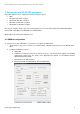
To configure the Avaya 3631 wireless phone for WMM and UAPSD:
Edit profile voice, and modify the following parameters:
3. WMM mode: select On
4. Power save mode: select On
7. Upgrading firmware
Firmware versions of the switches used for this application note are as follows:
• K.13.09 for ProCurve switch 5406zl
• WT.01.15 for ProCurve WESM zl
• Firmware version of the Avaya 3631 Wireless Phone : SW_1.3.1, available from HYPERLINK
"http://support.avaya.com/japple/css/japple?PAGE=ProductArea&temp.productID=146498&temp.bu
To upgrade firmware of the Avaya 3631 Wireless Phone:
1. Extract the firmware package to a web server. It is recommended to use MV_IPTel server downloadable
from Avaya web site:
http://support.avaya.com/japple/css/japple?temp.documentID=292038&temp.productID=107755&temp.bu
cketID=108025&PAGE=Document
2. Install MV_IPTel, launch it and start the services, and extract the firmware package as follows:
- file 3631upgrade.txt in C:\Program Files\Avaya\MV_IPTel\data\HTTPdata
- all files of the package ( including 3631upgrade.txt) in C:\Program
Files\Avaya\MV_IPTel\data\HTTPdata\down ( you have to create the down folder).
- file 46xxsettings.txt in C:\Program Files\Avaya\MV_IPTel\data\HTTPdata, this file is common to several
Avaya models, it is used to specify certain system parameters, and can be downloaded from :
http://support.avaya.com/japple/css/japple?temp.documentID=309244&temp.productID=291687&temp.rel
easeID=314364&temp.bucketID=108025&PAGE=Document
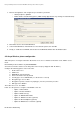
3. On the phone, under Advanced settings/IP addresses, configure option 4.File server with the IP address
of the web server.
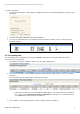
4. Restart the phone and associate it to a WLAN from where it can reach the file server. It will first download
the 46xxsettings.txt file and then run the firmware upgrade. It automatically restarts several times.
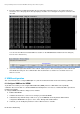
5. To check the firmware version of the phone: go to Advanced settings/Versions/Software versions on the
phone.