
HP VPN Firewall Module Series - HP SECBLADEIII-CMW520-R3819P01 Release Notes



13
Upgrade methods
To upgrade system software, use one of the following methods:
Upgrading system software from the CLI
Upgrading system software from the Web interface
Upgrading system software from BootWare menus
To upgrade the BootWare, use either of the following methods:
Upgrading the BootWare from the CLI
Upgrading the BootWare from BootWare menus
You must reboot the firewall module after a system software or BootWare upgrade. A
device reboot interrupts services.
Before a software upgrade, read the release notes to identify the command changes.
Some commands in the configuration file might not be supported after a software
upgrade.
Preparing for the upgrade
Before you upgrade system software, complete the following tasks:
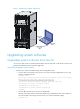
Set up the upgrade environment as shown in Figure 1 .
Run a TFTP or FTP server on the file server. (Skip this task if you upgrade software from
the Web interface.)
The firewall module does not come with TFTP or FTP server software. Prepare the
software yourself.
Assign an IP address to the file server. Make sure the management Ethernet port on the
firewall module and the file server can reach each other.
Transfer the software upgrade file to the file server and set the working directory on the
TFTP or FTP server.
Log in to the CLI of the firewall module through the console port. (Skip this task if you
upgrade software from the Web interface.)
Make sure the upgrade has minimal impact on the network services. During the
upgrade, the firewall module cannot provide any services.