
HP VPN Firewall Module Series - HP SECBLADEIII-CMW520-R3819P01 Release Notes



12
Appendix B Upgrading software
The following matrix shows the HP 20Gbps VPN Firewall Module and hosting device
compatibility:
20Gbps VPN Firewall Module
Hosting device
LSU1FWCEA0
10500 switches
11900 switches
7500 switches
LST1FW3A1
12500 switches
The software upgrade procedure is the same for both vpn firewall modules. This chapter
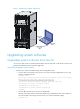
uses the LST1FW3A1 module installed in an 12508 to describe how to upgrade software from
the CLI, Web interface, and BootWare menus.
Software types
The following software types are available:
BootWare image—A .btw file that contains a basic segment and an extended segment.
The basic segment is the minimum code that bootstraps the system. The extended
segment enables hardware initialization and provides system management menus.
You can use these menus to load software and the startup configuration file or
manage files when the firewall module cannot start up correctly.
System software image—A .bin file that contains software features. You can assign the
following attributes to a system software image:
Main—The image is the primary image. The system always attempts to load the
main image at startup in preference to the backup image.
Backup—The image is the backup image. It is used only if the primary image is
corrupt or not available.
Secure—The image is the secure image. If both the main and backup system
software images are corrupt or not available, the device starts up with the secure
system software image. If no secure system software image is available, the firewall
module displays a failure prompt.
When you upgrade the system software, the BootWare is upgraded automatically. You do
not need to upgrade BootWare separately.
Configuration files
You can save settings you made to a configuration file so they can survive a reboot.
The firewall module supports .cfg and .xml configuration files. The .cfg configuration file
saves settings made at the CLI and in the Web interface. The .xml saves only settings made
in the Web interface.