
HP Switch Services Modules - HP SECBLADEII-CMW520-F3171P05 Release Notes


HP SECBLADEII-CMW520-F3171P05
Release Notes
Hewlett-Packard Development Company, L.P.
54
If the following information appears, the BootWare password is successfully modified.
Password Set Successfully.
Super password loss
The super password enables you to switch between four super levels. If you forget the super
password, you are unable to perform higher level operations.
Follow these steps to bypass the super password:
Step1 Select 8 on the main menu to clear the super password.
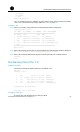
==================<EXTEND-BOOTWARE MENU>=====================
| <1> Boot System |
| <2> Enter Serial SubMenu |
| <3> Enter Ethernet SubMenu |
| <4> File Control |
| <5> Modify BootWare Password |
| <6> Skip Current System Configuration |
| <7> BootWare Operation Menu |
| <8> Clear Super Password |
| <9> Storage Device Operation |
| <0> Reboot |
=============================================================
Enter your choice(0-9):8
If the following information appears, the super password is successfully cleared.
Clear Application Password Success
Step2 Exit from the main menu and reboot the SecBlade card to directly enter the system view.
NOTE:
This setting works only once. The super password will be restored when the SecBlade card is
rebooted for a second time.
Backing up and restoring the BootWare
program file
Select 7 on the main menu to enter the BootWare operation submenu. For details, see
“BootWare operation submenu” on page 33.
Backing up the entire BootWare program file
Backing up the entire BootWare program file on the BootWare menu
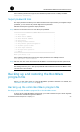
To back up the entire BootWare program file, you need to first back up the basic segment
and then the extended segment as follows: