
HP Switch Services Modules - HP SECBLADEII-CMW520-F3171P05 Release Notes

HP SECBLADEII-CMW520-F3171P05
Release Notes
Hewlett-Packard Development Company, L.P.
47
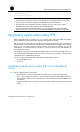
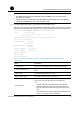
Step3 Log in to the FTP server.
<HP> ftp 192.168.80.200
Trying 192.168.80.200 ...
Press CTRL+K to abort
Connected to 192.168.80.200.
220 3Com 3CDaemon FTP Server Version 2.0
User(192.168.80.200:(none)):guest
331 User name ok, need password
Password:
230 User logged in
[ftp]
Step4 Upgrade applications.
Using FTP, you can download application files from the FTP server to overwrite existing
application files on the SecBlade card to implement application upgrade. The upgraded
application files take effect at the next boot.
# Download the main.bin file from the FTP server to the SecBlade card.
[ftp] get main.bin main.bin
cfa0:/main.bin has been existing. Overwrite it? [Y/N]:y
227 Entering passive mode (192,168,80,200,5,33)
125 Using existing data connection
226 Closing data connection; File transfer successful.
FTP: 10867848 byte(s) received in 472.515 second(s), 23.00K byte(s)/sec
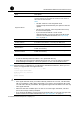
NOTE:
•
When you download an application file, if the file name already exists on the SecBlade
card, you will be prompted whether to overwrite the existing file. You need to enter Y
or
N to make a confirmation.
• You can upgrade configuration files in the way you upgrade application files.
You can
use a text editor to modify a configuration file. You can download the modified
configuration file to the SecBlade card and the modified configuration file takes effect
at the next boot.
• If you want the SecBlade card to use the downloaded file, you need to specify the file
for the next boot. For related information, see “Specifying files” on page 23.
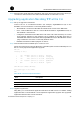
Step5 Back up application files.
Using FTP, you can upload application files from the SecBlade card to the FTP server for the
backup purpose.
# Upload the main.bin file from the SecBlade card to the FTP server and save it as main.bin.
[ftp] put main.bin main.bin
227 Entering passive mode (192,168,80,200,5,34)
125 Using existing data connection
226 Closing data connection; File transfer successful.
FTP: 10867848 byte(s) sent in 172.505 second(s), 63.00Kbyte(s)/sec
[ftp] quit
221 Service closing control connection