
HP Switch Services Modules - HP SECBLADEII-CMW520-F3171P05 Release Notes

HP SECBLADEII-CMW520-F3171P05
Release Notes
Hewlett-Packard Development Company, L.P.
44
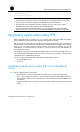
Step4 After the main application file is upgraded, select 0 to return to the main menu, where you
can select 1 on the main menu to reboot the SecBlade card from the CF card.
Upgrading application files Using TFTP at the CLI
Step1 Set up an upgrade environment.
Connect the PC to an Ethernet interface (for example, GigabitEthernet 0/1) on the
SecBlade card and ensure the connectivity between them.
• The SecBlade card serves as the TFTP client while the PC serves as the TFTP server.
• Use a crossover Ethernet cable to connect Ethernet interface GigabitEthernet 0/1 on
the SecBlade card to the PC.
• Configure IP addresses for the TFTP server and client and ensure that they are on the
same network segment. In this example, the IP address of the TFTP server (PC) is
192.168.80.200 and that of the TFTP client (GigabitEthernet 0/1) is 192.168.80.10. Use the
ping command to check the connectivity between them.
• Enable the terminal emulation program on the PC.
Step2 View the files and the available space on the CF card.
Use the dir command to query the files in the current file system and the available space on
the CF card to prepare for application upgrade.
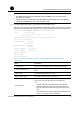
<HP> dir
Directory of cfa0:/
0 -rw- 10867848 Jun 13 2007 13:21:20 main.bin
1 -rw- 4722 Jun 26 2007 12:55:42 config.cfg
2 -rw- 1128 Jun 27 2007 11:07:24 startup.cfg
3 -rw- 10129712 Jun 27 2007 10:26:02 update.bin
4 drw- - Jun 02 2007 18:28:14 logfile
62472 KB total (41855.5 KB free)
File system type of cfa0: FAT16
<HP>
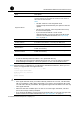
Table 18 dir command output information
Field Description
Directory of cfa0:/ Name of the current directory
62472 KB total (41855.5 KB free) Used space on the CF card (available space on the CF card)
File system type of cfa0 File system type that the CF card supports
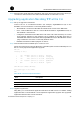
Step3 Upgrade applications.
Using TFTP, you can download application files from the TFTP server to overwrite existing
application files on the SecBlade card to implement application upgrade. The upgraded
application files take effect at the next boot.