
HP Switch Services Modules - HP SECBLADEII-CMW520-F3171P05 Release Notes

HP SECBLADEII-CMW520-F3171P05
Release Notes
Hewlett-Packard Development Company, L.P.
43
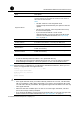
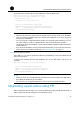
Field Description
Target File Name
Set a name for the target file to be saved to the SecBlade card
and the extension of the target file needs to be the same as
that of the downloaded file.
NOTE:
• The first “main.bin” is the target file name
automatically remembered by the system at the last
update.
• The second “main.bin” is the target file name set by
the user for this update.
• If you want the SecBlade card to use the
downloaded file, you need to specify the file for the
next boot. For related information, see “Specifying
files” on page 23.
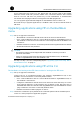
Server IP Address IP address of the TFTP server
Local IP Address IP address of the interface connecting the TFTP server
Gateway IP Address IP address of the gateway. You do not need to configure it.
FTP User Name
FTP username, which will be used for FTP downloading, but not
for TFTP downloading.
FTP User Password
FTP password, which will be used for FTP downloading, but not
for TFTP downloading.
NOTE:
• To use the default parameter after a colon, press Enter directly.
• If the Ethernet port parameter settings fail to pass CRC check, the system adopts the
default settings and displays “Check net params crc error, use the default value.”
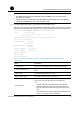
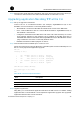
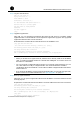
Step3 After the above configurations, you will return to the Ethernet submenu, where you can
select 2 to upgrade the main application file.
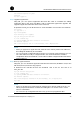
Loading................................... done
10129712 bytes downloaded!
Updating File cfa0:/main.bin
.........
Update Success!
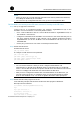
CAUTION:
• If the application file name you entered already exists on the CF card, “The file exists,
will you overwrite it? [Y/N]” will be prompted. If you enter Y, the application file on the
CF card will be directly overwritten. The upgraded applicat
ion file will become the only
main application file.
• Make sure that the available space on the CF card is enough. Otherwise, “The free
space isn’t enough” will be prompted.
• If you want the SecBlade card to use the downloaded file, you need to specify the file
for the next boot. For related information, see “Specifying files” on page 23.