
HP Switch Services Modules - HP SECBLADEII-CMW520-F3171P05 Release Notes

HP SECBLADEII-CMW520-F3171P05
Release Notes
Hewlett-Packard Development Company, L.P.
42
NOTE:
• The TFTP server program is not shipped with the SecBlade card and you need to
purchase and install it.
• When you upgrade application files using TFTP on the BootWare menu, use Ethernet
interface GigabitEthernet 0/2 on the SecBlade cards.
Step2 Configure Ethernet interface parameters on the BootWare menu.
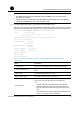
Select 3 on the main menu to enter the Ethernet submenu, where you can select 5 to enter
the Ethernet parameter setting interface to configure the Ethernet interface parameters.
==================<ETHERNET PARAMETER SET>===================
Note: '.' = Clear field.
'-' = Go to previous field.
Ctrl+D = Quit.
=============================================================
Protocol (FTP or TFTP):tftp
Load File Name :main.bin
:main.bin
Target File Name :main.bin
:main.bin
Server IP Address :192.168.80.200
Local IP Address :192.168.80.10
Gateway IP Address :
FTP User Name :
FTP User Password :
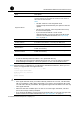
Table 17 Description of display information about Ethernet interface parameter
configuration
Field Description
'.' = Clear field To clear the current field, input a (.) and then press Enter.
'-' = Go to previous field
To go to the previous field, input a hyphen (-) and then press
Enter.
Ctrl+D = Quit
The shortcut key combination for quitting the Ethernet
parameter setting interface is Ctrl+D.
Protocol (FTP or TFTP) Select TFTP or FTP to upgrade applications.
Load File Name
Select the file to be downloaded.
Set the path where the file is stored on the TFTP server.
NOTE:
• The first “main.bin” is the file name automatically
remembered by the system at the last update; the
second “main.bin” is the source file name set by the
user.
• An application file name including the extension such
as .bin, cannot exceed 50 characters.