
HP Switch Services Modules - HP SECBLADEII-CMW520-F3171P05 Release Notes

HP SECBLADEII-CMW520-F3171P05
Release Notes
Hewlett-Packard Development Company, L.P.
41
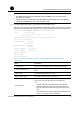
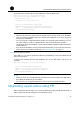
Download successfully!
10129792 bytes downloaded!
NOTE:
• The BootWare program is automatically upgraded when applications are upgraded,
that is, you do not need to upgrade the BootWare program separately.
• The file name, size, and path in the above figures may vary. Check the current
BootWare and application versions before upgrading them.
• If you upgraded the extended segment, you only upgrade part of the BootWare
program. Once an error occurs, you can start the BootWare upgrade process again
Upgrading applications using TFTP
When application files are large, you can upgrade them using the Trivial File Transfer
Protocol (TFTP) to greatly shorten the upgrade and maintenance time.
TFTP, a protocol in the TCP/IP suite, is used for trivial file transfer between client and server to
provide simple, low-overhead file transfer services. TFTP provides unreliable data transfer
services over the User Datagram Protocol (UDP) and does not provide any access
authorization or authentication mechanism. It employs timeout and retransmission to
guarantee data delivery.
The SecBlade card serves as the TFTP client while the file server serves as the TFTP server. You
can upload/download applications to/from the file server by entering a corresponding
command on the configuration terminal.
You can upgrade application files using TFTP in the following two ways:
• On the BootWare menu
• At the CLI
Upgrading applications using TFTP on the BootWare
menu
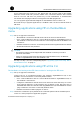
Step1 Set up a TFTP upgrade environment.
• The SecBlade card serves as the TFTP client while the PC serves as the TFTP server.
• Use a crossover Ethernet cable to connect Ethernet interface GigabitEthernet 0/2 on
the SecBlade card to the PC and ensure the connectivity between the SecBlade card
and the PC.
• Enable the TFTP server on the PC and set the path where the application files are
stored.