
HP Switch Services Modules - HP SECBLADEII-CMW520-F3171P05 Release Notes


HP SECBLADEII-CMW520-F3171P05
Release Notes
Hewlett-Packard Development Company, L.P.
29
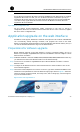
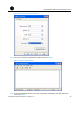
Step7 Set the terminal emulation to VT100 or autodetect and click OK to return to the
HyperTerminal window.
Figure 8 Set the terminal emulation type
Step8 Log in to the SecBlade at the switch side
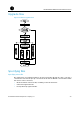
Introduction to the BootWare menu
Main menu
After the above configurations are completed and the SecBlade is powered on, the card
first performs system initialization. After system initialization, the following information is
displayed on the configuration terminal:
NOTE:
For different SecBlade cards or different versions of BootWare programs, the information
displayed on the configuration terminal may slightly differ.
System start booting...
Booting Normal Extend BootWare........
****************************************************************************