
HP Switch Services Modules - HP SECBLADEII-CMW520-F3171P05 Release Notes


HP SECBLADEII-CMW520-F3171P05
Release Notes
Hewlett-Packard Development Company, L.P.
25
Software upgrade
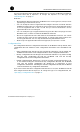
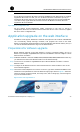
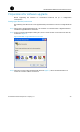
After login, select System Management > Software Upgrade from the navigation tree to
enter the page shown in
Figure 3 Software upgrade page
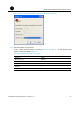
Make settings as described in Table 9 to upgrade software.
Table 9 Make settings for upgrading software
Field Action
File Click Browse to select the application file saved locally
Filename:
Enter a file name to save the downloaded file to the
SecBlade. The file extension must be .bin or .app.
If you want the SecBlade to use the downloaded file, you
need to specify the file for the next boot. For related
information, see “Specifying files” on page 23.
If a file with the same name exists,
overwrite it without any prompt
Select this option if you want to overwrite the existing file on
the SecBlade without any prompt.
Reboot after the upgrade is
finished
Select this option if you want the SecBlade to reboot
immediately after the software is upgraded.
Software upgrade in conventional methods
SecBlade provide the BootWare menu and a CLI, through either of which you can
configure, manage, and upgrade the cards.
NOTE:
The upgrade procedures of SecBlade are similar unless otherwise specified in this chapter.