
Installation and Getting Started Guide for 720wl/740wl/760wl 2004-03


Hardware Installation
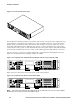
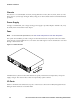
Figure 2-2. Access Control Server 740wl
R
E
S
E
R
V
E
D
1
1
2
3
2
3
4
ON
H
DD
S
C
R
OL
L
S
E
L
EC
T
N
E
T
W
ORK
U
P
L
I
NK
J8154A
hp
proc
urv
e
a
ccess
control
s
erver 740wl
The hardware for all three products is very similar, and consists of a chassis, power supply, fans, I/O
ports, indicators, and switches. All systems have at least two RJ45 connectors—one for the network
uplink, used to connect the system to the network, and one that is reserved for future use. Access
Controllers and Integrated Access Managers may have up to twelve downlink access ports, used to
connect wireless access points or other client-side devices to the system. Option cards with downlink
ports can be pre-installed at the factory, or they can be ordered separately and added at a later time.
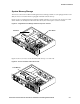
A front panel view of an Access Controller 720wl with a 4-port Ethernet card installed is shown in
Figure 2-3. An Integrated Access Manager 760wl looks similar.
Figure 2-3. Front panel view–Integrated Access Manager 760wl or Access Controller 720wl
1
1
2
3
2 4
ON
HDD
SCROLL
SELECT
NETWORK
UPLINK
RESERVED
hp procurve
J8153A
access controller 720wl
3
Figure 2-4 shows a front panel view of the Access Control Server 740wl.
Figure 2-4. Front panel view–Access Control Server 740wl
1
1
2
3
2 4
ON
HDD
SCROLL
SELECT
NETWORK
UPLINK
RESERVED
hp procurve
J8154A
access control server 740wl
3
Note: The system can optionally be configured to use an alternate port, such as a Fiber Gigabit
Ethernet port on an option card, as the network uplink.
2-2 HP ProCurve Secure Access 700wl Series Installation and Getting Started Guide