
Installation and Getting Started Guide for ProCurve 2600 Switches 2008-01





2-26
Installing the Switch
Installation Procedures
Installing the Switch
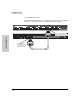
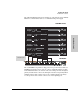
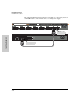
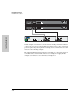
The following illustration demonstrates an example of connectivity between
an RPS/EPS device and a Switch device as a PoE power supply.
Device Connected
Power Status
R1 R2 R3 R4 R5 R6 E1
Device
Connected
Pow er
Status
E2
RPS 1 RPS 2 RPS 3 RPS 4 RPS 5 RPS 6 EPS 1 EPS 2
EPS Power: 50V 370W total for PoE applications. Power is shared when both ports are used.
RPS Power: 12V backup to one connected device. Lowest-numbered port has priority.
Line: 50/60 Hz.
10
0
-
2
40 V~ 9.1A (9,1A)
Console
EPS Input
HP ProCurve
RPS Input
12V 7.5A
Line 50/60 Hz.
100-240 V~ 7.5 A
Switch EPS output
EPS input port