
SuperStack 3 Advanced RPS Type 3 Power Module (3C16075) Installation Guide




SuperStack 3 Advanced RPS Chassis Loading Limitations
5
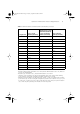
Table 1
Maximum Number of Advanced RPS Power Modules per Chassis
Configuration
Type 1 60 W
Module (3C16072)
Type 1 100 W Module
(3C16073), Type 2 (100
W) Module (3C16074),
or Type 2A (100 W)
Module (3C16074A)
Type 3 Module
(325 W) (3C16075)
A 8 none none
B 7 none none
C 6 1 none
D 5 1 none
E 4 2 none
F 3 3 none
G 2 3 none
H 1 4 none
I none 4 none
J
*
* Install the power modules in slots 7 and 8.
none 1 1
K
†
† Install the 100 W and Type 3 Module in slots 7 and 8, and the 60 W Module in slot 5 or 6, whichever
is next to the 100 W Module.
1 1 1
L
‡
‡ Install the Type 3 Module in slot 7, and the 60 W Modules in slots 8 and 5.
2 none 1
M
**
**Install two Type 3 Modules in the chassis using single DC cables, that is, both modules drawing
power separately. If using this configuration, install the modules in slots 7 and 8.
none none 2
N
††
††Install four Type 3 Modules in the chassis using the optional ‘Y’ cable. Two modules that are paired,
power-share at any one time. If using this configuration, install the four modules in slots 5, 6, 7, and
8. Connect the ‘Y’ cables across slots 7 and 5, and 8 and 6 respectively, that is, the power modules in
slots 7 and 5 are paired, and the power modules in 8 and 6 are paired.
none none 4
DUA1607-5AAA02.fm Page 5 Tuesday, September 26, 2000 3:14 PM