
H3C S7500 Series Ethernet Switches Release 3135 DHCP Configuration Examples

Routing Configuration Examples
H3C S7500 Series Ethernet Switches Release 3135 Chapter 1 Routing Overview
1-29
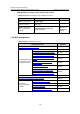
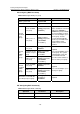
I. Configuring Basic BGP Functions
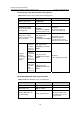
Table 1-73 Configure basic BGP functions
Operation Command Description
Enter system view
system-view
—
Enable BGP and enter
BGP view
bgp as-number
Required
By default, BGP is
disabled.
Specify the AS number for
the BGP peers
peer group-name
as-number as-number
By default, a peer is not
assigned an AS number.
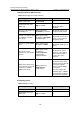
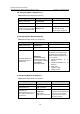
Assign a description string
for a BGP peer/a BGP
peer group
peer { group-name |
ip-address } description
description-text
Optional
By default, a peer/a peer
group is not assigned a
description string.
Activate a specified BGP
peer
peer { group-name |
ip-address } enable
Optional
By default, a BGP peer is
active.
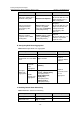
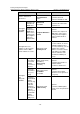
Specify the source
interface for route update
packets
peer { group-name |
ip-address }
connect-interface
interface-type
interface-number
Optional
By default, the source
interface of the optimal
route update packets is
used as the source
interface.
Allow routers that belong
to non-directly connected
networks to establish
EBGP connections.
peer group-name
ebgp-max-hop
[ hop-count ]
Optional
By default, routers that
belong to two non-directly
connected networks
cannot establish EBGP
connections.
You can configure the
maximum hops of EBGP
connection by specifying
the hop-count argument.
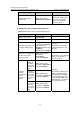
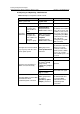
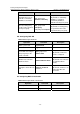
II. Importing Routes
Table 1-74 Import routes
Operation Command Description
Enter system view
system-view
—
Enable BGP, and enter
BGP view
bgp as-number
—