
3Com Switch 8800 Family Firewall Module Configuration and Command Reference Guide
Transparent Firewall Configuration Commands 339
mask: Subnet mask of the firewall system. If not provided, the default subnet
mask of the class to which the IP address belongs is used.
Description
Use the firewall system-ip command to assign an IP address for a firewall
system.
Use the undo firewall system-ip command to revert to the default system IP
address.
The IP address of a firewall system is 169.0.0.1/8 by default.
When a firewall operates in transparent mode, all the interfaces of it operate in
Layer 2. That is, the interfaces act as switching ports, and you cannot specify Layer
3 properties (such as assigning IP addresses) for them. But a firewall must have an
IP address for administrators to manage it or for it to provide network services. To
solve this problem, a firewall that operates in transparent mode is assigned a
default system IP address (169.0.0.1/8). You can change this IP address using this
command.
You cannot configure the system IP address of a firewall when the firewall
operates in routing mode.
Example
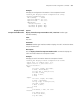
# Configure a system IP address for a firewall.
[SecBlade_FW] firewall mode transparent
Set system ip address successfully.
All the Interfaces’s ip addresses have been deleted.
The mode is set successfully.
[SecBlade_FW] firewall system-ip 10.1.1.5 255.255.255.0
Set system ip address successfully.
firewall
transparent-mode
aging-time
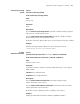
Syntax
firewall transparent-mode aging-time seconds
undo firewall transparent-mode aging-time
View
System view
Parameter
seconds: Aging time of the MAC forwarding table, in the range of 10 to 1000000
(seconds).
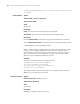
Description
Use the firewall transparent-mode aging-time command to configure the
aging time of the MAC forwarding table.
Use the undo firewall transparent-mode aging-time command to restore the
default configuration.
By default, the aging time of the MAC forwarding table is 300 seconds.