
3Com Switch 8800 Family Firewall Module Configuration and Command Reference Guide

112 CHAPTER 7: FIREWALL CONFIGURATION
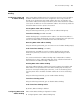
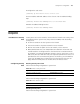
Configuring/removing black list entry
Perform the following configuration in system view.
The value of minutes ranges from 1 to 1000, in minutes. Without parameter
timeout minutes, the configured entry is a permanent entry. Without parameter
sour-addr means removing all entries in the current black list.
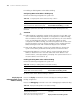
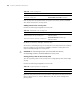
Enabling or disabling black list
Perform the following configuration in system view.
By default, black list is disabled.
Displaying and
Debugging Black List
Execute the display command in all views to display the running of black list entry
or black list configuration.
Execute the debugging command in user view to enable the debugging of the
back list.
Black List Configuration
Example
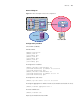
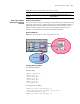
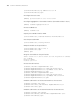
Network requirements
The server and the client PC are located in firewall trust zone and untrust zone
respectively. It is required to filter all packets sent from the client PC within 100
minutes. The client IP address is 202.0.0.1.
Tabl e 100 Configuring black list entry
Operation Command
Configure black list entry firewall blacklist sour-addr [ timeout minutes ]
Remove black list entry undo firewall blacklist [ sour-addr ]
Tabl e 101 Enabling or disabling black list
Operation Command
Enable black list firewall blacklist enable
Disable black list undo firewall blacklist enable
Tabl e 102 Display and debug black list
Operation Command
Display the current black list entry information
or running status
display firewall blacklist { enable | item [
sour-addr ]
Enable the debugging for the black list
debugging firewall blacklist { all | item |
packet }