
3Com Switch 7750 Configuration Guide

Configuring a Port-Based VLAN 99
■ The default VLAN IDs of the Trunk ports on the local and peer devices must be
the same. Otherwise, packets cannot be transmitted properly.
Displaying and
Maintaining Port-Based
VLAN
Configuring a
Port-Based VLAN
Configuration prerequisites
Create a VLAN before configuring a port-based VLAN.
Configuration procedure
Port-based VLAN
Configuration Example
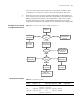
Configuration requirements
■ Create VLAN 2 and VLAN 3 and specify the description string of VLAN 2 as
home;
■ Add Ethernet2/0/1 and Ethernet2/0/2 to VLAN 2 and add Ethernet2/0/3 and
Ethernet2/0/4 to VLAN 3.
Network diagram
Figure 34 Network diagram for VLAN configuration
Configuration procedure
# Create VLAN 2 and enter its view.
<SW7750> system-view
[SW7750] vlan 2
# Specify the description string of VLAN 2 as home.
[SW7750-vlan2] description home
# Add Ethernet2/0/1 and Ethernet2/0/2 ports to VLAN 2.
[SW7750-vlan2] port Ethernet2/0/1 Ethernet2/0/2
# Create VLAN 3 and enter its view.
[SW7750-vlan2] quit
[SW7750]vlan 3
# Add Ethernet2/0/3 and Ethernet2/0/4 ports to VLAN 3.
[SW7750-vlan3] port Ethernet2/0/3 Ethernet2/0/4
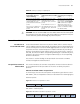
To do... Use the command... Remarks
Display the hybrid or trunk
ports
display port { hybrid | trunk } Available in any view.
Eth2/0/1
Eth2/0/2
Eth2/0/3
Eth2/0/4
VLAN 2 VLAN 3