
3Com Switch 7750 Configuration Guide


86
CONFIGURING
H
ARDWARE-DEPENDENT SOFTWARE
Configuring Boot
ROM Upgrade with
App File
By enabling Boot ROM to upgrade together with the app file, you can ensure that
the Boot ROM versions of the current Fabric and service modules can match the
version of the current app file, thus avoiding invalid feature implementation
caused by mismatching.
Two upgrade types are available:
■ The current startup file as the upgrade file for Boot ROM
■ The specified App file as the upgrade file for Boot ROM
Boot ROM Upgrade
Configuration
c
CAUTION:
■ If you do not specify a slot number in the boot bootrom command, the system
upgrades all normal modules in position by default.
■ After you specify the primary startup file for the next booting, the system
upgrades all normal modules in the process of upgrading Boot ROM. You need
also to confirm the upgrade operation in the upgrade process.
Boot ROM Upgrade
Configuration Example
Network requirements
■ Use the current startup file to upgrade the Boot ROMs of all normal I/O Module
modules in position.
■ Use the specified App file (abcd.app) to upgrade the Boot ROMs of all normal
I/O Module modules in position.
■ Specify the App file abcd.app as the primary startup file for next booting and
use it to upgrade the Boot ROMs.
Configuration example
# Use the current startup file to upgrade the Boot ROMs of all normal I/O Module
modules in position.
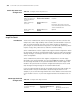
Table 724 Configure Boot ROM upgrade
Operation Command Description
Set the current startup file as the
upgrade file for Boot ROM
boot bootrom default [ slot
slot-number-list]
Optional
Set the specified App file as the
upgrade file for Boot ROM
boot bootrom file-url [ slot
slot-number-list]
Optional
Set the primary startup file at next
booting and use it to upgrade the
Boot ROM
boot boot-loader primary file-url Optional