
3Com Switch 7750 Configuration Guide


922 CHAPTER 83: TELNET PROTECTION CONFIGURATION
Configuring SNMP
Protection
Configuring ICMP
Protection
Configuring
Default-route Telnet
Protection
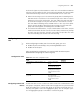
Enable global Telnet
protection or special
ARP Telnet protection
attack-protection
[ ip-address ]
Required
If you use this command with the
ip-address parameter, you can protect
the specified Layer-3 interfaces.
Table 710 Configure Telnet protection
Operation Command Description
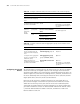
Table 711 Configure SNMP protection
Operation Command Description
Enter system view system-view -
Enable SNMP
protection
attack-protection snmp
[ ip-address ]
Required
If you use this command with the
ip-address parameter, you can protect
the packets that match this source IP
address only
Enable global Telnet
protection or special
ARP Telnet protection
attack-protection
[ ip-address ]
Required
If you use this command with the
ip-address parameter, you can protect
the specified Layer-3 interfaces.
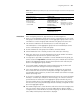
Table 712 Configure ICMP protection
Operation Command Description
Enter system view system-view -
Enable ICMP
protection
attack-protection icmp
[ ip-address ]
Required
If you use this command with the
ip-address parameter, you can
protect the packets that match this
source IP address only
Enable global Telnet
protection or special
ARP Telnet protection
attack-protection
[ ip-address ]
Required
If you use this command with the
ip-address parameter, you can
protect the specified Layer-3
interfaces.
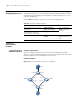
Table 713 Configuring default-route Telnet protection
Operation Command Description
Enter system view system-view -
Enable default-route
Telnet protection
undo attack-protection
disable-defaultroute
Required
By default, default-route
Telnet protection is disabled.