
3Com Switch 7750 Configuration Guide

900 CHAPTER 81: REMOTE-PING CONFIGURATION
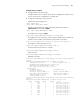
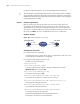
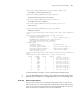
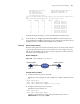
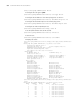
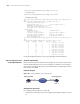
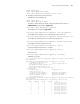
For detailed output description, see the corresponding command manual.
UDP Test (Udpprivate
Test) on the Specified
Ports
Network requirements
Both the remote-ping client and the remote-ping server are Switch 7750s. Perform
a remote-ping Udpprivate test on the specified ports between the two switches to
test the RTT of UDP packets between this end (remote-ping client) and the
specified destination end (remote-ping server).
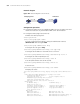
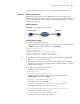
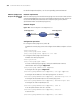
Network diagram
Figure 248 Network diagram for the Udpprivate test
Configuration procedure
■ Configure remote-ping Server (Switch B):
# Enable the remote-ping server and configure the IP address and port to listen
on.
<7750> system-view
[7750] remote-ping-server enable
[7750] remote-ping-server udpecho 10.2.2.2 8000
■ Configure remote-ping Client (Switch A):
# Enable the remote-ping client.
<7750> system-view
[7750] remote-ping-agent enable
# Create a remote-ping test group, setting the administrator name to
administrator and test tag to udpprivate.
[7750] Remote-ping administrator udpprivate
# Configure the test type as udpprivate.
[7750-remote-ping-administrator-udpprivate] test-type udpprivate
# Configure the IP address of the remote-ping server as 10.2.2.2.
[7750-remote-ping-administrator-udpprivate] destination-ip 10.2.2.2
# Configure the destination port on the remote-ping server.
[7750-remote-ping-administrator-udpprivate] destination-port 8000
# Configure to make 10 probes per test.
[7750-remote-ping-administrator-udpprivate] count 10
# Set the probe timeout time to 5 seconds.
[7750-remote-ping-administrator-udpprivate] timeout 5
# Start the test.
[7750-remote-ping-administrator-udpprivate] test-enable
Switch A
Switch B
remote
-
ping Client
IP network
10
.
1
.
1
.
1
/
8
10
.
2
.
2
.
2
/
8
remote
-
ping Server