
3Com Switch 7750 Configuration Guide

Remote-ping Configuration Example 897
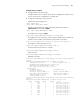
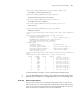
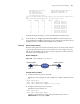
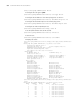
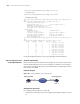
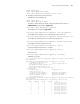
For detailed output description, see the corresponding command manual.
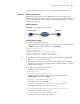
SNMP Test Network requirements
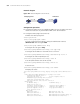
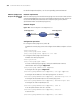
Both the remote-ping client and the SNMP Agent are Switch 7750s. Perform
remote-ping SNMP tests between the two switches to test the time required from
Switch A sends an SNMP query message to Switch B (SNMP Agent) to it receives a
response from Switch B.
Network diagram
Figure 246 Network diagram for the SNMP test
Configuration procedure
■ Configure SNMP Agent (Switch B):
# Start SNMP agent and set SNMP version to V2C, read-only community name
to public, and read-write community name to private.
<Sysname> system-view
[Sysname] snmp-agent
[Sysname] snmp-agent sys-info version v2c
[Sysname] snmp-agent community read public
[Sysname] snmp-agent community write private
n
■ The SNMP network management function must be enabled on SNMP agent
before it can receive response packets.
■ The SNMPv2c version is used as reference in this example. This configuration
may differ if the system uses any other version of SNMP. For details, see SNMP -
RMON Operation Manual.
■ Configure remote-ping Client (Switch A):
# Enable the remote-ping client.
<7750> system-view
[7750] remote-ping-agent enable
# Create a remote-ping test group, setting the administrator name to
administrator and test tag to snmp.
[7750] Remote-ping administrator snmp
# Configure the test type as snmp.
[7750-remote-ping-administrator-snmp] test-type snmpquery
# Configure the destination IP address as 10.2.2.2.
[7750-remote-ping-administrator-snmp] destination-ip 10.2.2.2
# Configure to make 10 probes per test.
[7750-remote-ping-administrator-snmp] count 10
# Set the probe timeout time to 30 seconds.
Switch A
Switch B
remote
-
ping Client
IP network
10
.
1
.
1
.
1
/
8
10
.
2
.
2
.
2
/
8
SNMP Agent