
3Com Switch 7750 Configuration Guide

Remote-ping Configuration 881
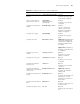
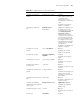
Enable the remote-ping client
function
remote-ping-agent enable Required
By default, the remote-ping
client function is disabled.
Create a remote-ping test
group and enter its view
remote-ping
administrator-name
operation-tag
Required
By default, no test group is
configured.
Configure the destination IP
address
destination-ip ip-address Required
You can configure an IP
address or a host name.
By default, no destination
address is configured.
Configure the test type test-type http Required
By default, the test type is
ICMP.
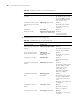
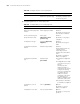
Configure dns-server dns-server ip-address
Figure 233 Required when
you use the destination-ip
command to configure the
destination address as the
host name.
Figure 234 By default, no
IP address of the DNS server
is configured.
Configure the source IP
address
source-ip ip-address Optional
By default, no source IP
address is configured.
Configure the source port source-port port-number Optional
By default, no source port is
configured.
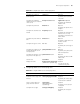
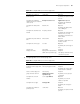
Configure the number of
probes per test
count times Optional
By default, each test makes
one probe.
Configure the maximum
number of history records that
can be saved
history-records number
Figure 235 Optional
By default, the maximum
number is 50.
Configure the automatic test
interval
frequency interval Optional
By default, the automatic test
interval is zero seconds,
indicating no automatic test
will be made.
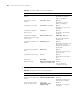
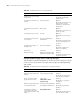
Configure the probe timeout
time
timeout time Optional
By default, a probe times out
in three seconds.
Configure the type of service tos value Optional
By default, the service type is
zero.
Table 697 Configure an HTTP test on a remote-ping client
Operation Command Description