
3Com Switch 7750 Configuration Guide

764 CHAPTER 70: NTP CONFIGURATION
The above output information indicates that S7750-2 is synchronized to S7750-1,
and the stratum of its clock is 3, one stratum higher than S7750-1.
# View the information about the NTP sessions of S7750-2. You can see that
S7750-2 establishes a connection with S7750-1.
[SW7750-2]dis ntp-service sessions
source reference stra reach poll now offset delay disper
**************************************************************************
[12345]1.0.1.11 127.127.1.1 2 1 64 1 350.1 15.1 0.0
note: 1 source(master),2 source(peer),3 selected,4 candidate,5 configured
NTP Peer Mode
Configuration
Network requirements
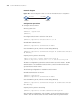
3Com2 sets the local clock to be the NTP master clock, with the clock stratum
being 2.
Configure a Switch 7750 to operate as a client, with 3Com2 as the time server.
3Com2 will then operate in the server mode automatically. Meanwhile, 3Com3
sets the Switch 7750 to be its peer.
n
This example assumes that
■ 3Com2 is a switch that allows its local clock to be the master clock.
■ 3Com3 is a switch that allows its local clock to be the master clock and the
stratum of its clock is 1.
Network diagram
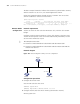
Figure 198 Network diagram for NTP peer mode configuration
Configuration procedures
1 Configure the Switch 7750.
# Set 3Com2 to be the time server.
<SW7750> system-view
[SW7750] ntp-service unicast-server 3.0.1.31
2 Configure 3Com3 (after the Switch 7750 is synchronized to 3Com2).
# Enter system view.
3Com 2
3Com
3
Switch 7500
3 . 0 . 1 . 31 / 24
3 . 0 . 1 . 32 / 24 3 . 0 . 1 . 33 / 24