
3Com Switch 7750 Configuration Guide



DHCP Snooping Configuration Example 635
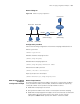
■ Enable DHCP snooping on the switch, and specify Ethernet 2/0/1 as the DHCP
snooping trusted port.
■ Enable IP filtering on Ethernet 2/0/2, Ethernet 2/0/3, and Ethernet 2/0/4 to
prevent attacks to the server from clients using fake source IP addresses.
■ Create static binding entries on the switch, so that Host A using a fixed IP
address can access external networks.
Network diagram
Figure 165 Network diagram for IP filtering configuration
Configuration procedure
# Enable DHCP snooping on the switch.
<Switch> system-view
[Switch] dhcp-snooping
# Specify Ethernet 2/0/1 as the trusted port.
[Switch] interface Ethernet2/0/1
[Switch-Ethernet2/0/1] dhcp-snooping trust
[Switch-Ethernet2/0/1] quit
# Enable IP filtering on Ethernet 2/0/2, Ethernet 2/0/3, and Ethernet 2/0/4 to filter
packets based on the source IP addresses/MAC addresses.
[Switch] interface Ethernet2/0/2
[Switch-Ethernet2/0/2] ip check source ip-address mac-address
[Switch-Ethernet2/0/2] quit
[Switch] interface Ethernet2/0/3
[Switch-Ethernet2/0/3] ip check source ip-address mac-address
[Switch-Ethernet2/0/3] quit
[Switch] interface Ethernet2/0/4
[Switch-Ethernet2/0/4] ip check source ip-address mac-address
[Switch-Ethernet2/0/4] quit
# Create static binding entries on Ethernet 2/0/2 of the switch.
Switch
DHCP-Snooping
Host A
IP:1.1.1.1
MAC:0001-0001- 0001
Eth2/0/2
Client C
Eth2/0/4
Eth2/0/1
DHCP Server
Client B
Eth2/0/3