
3Com Switch 7750 Configuration Guide




554 CHAPTER 52: VRRP CONFIGURATION
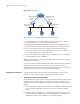
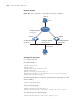
Figure 142 Virtual router
The switches in a backup group have the following features:
■ This virtual router has its own IP address: 10.100.10.1 (which can be the
interface address of a switch within the backup group).
■ The switches within the backup group have their own IP addresses (such as
10.100.10.2 for the master switch and 10.100.10.3 for the backup switch).
■ Hosts on the LAN only know the IP address of this virtual router, that is,
10.100.10.1, but not the specific IP addresses 10.100.10.2 of the master
switch and 10.100.10.3 of the backup switch.
■ Hosts in the LAN use the IP address of the virtual router (that is, 10.100.10.1)
as their default next-hop IP addresses.
Therefore, hosts within the network will communicate with the other networks
through this virtual router.
If the master switch in the backup group goes down, the backup switch with the
highest priority functions as the new master switch to guarantee normal
communication between the hosts and the external networks. This ensures the
communications between the hosts and the external networks.
Virtual Router Overview After you enable VRRP on the switches of a backup group, a virtual router is
formed. You can perform related configuration on the virtual router.
Configuring a virtual router IP address
The IP address of the virtual router can be an unassigned IP address of the network
segment where the backup group is located or the interface IP address of a
member switch in the backup group. Virtual router IP address has the following
features:
■ You can specify the virtual router IP address as the IP address used by a member
switch in the backup group. In this case, the switch is called an IP address
owner.
■ A backup group is established if it is assigned an IP address for the first time. If
you then add other IP addresses to the backup group, the IP addresses are
added to the virtual router IP address list of the backup group.
Host 1
Ethernet
Master
Network
Host 2 Host 3
Backup
10.100.10.7 10 .100.10.910.100.10.8
Actual IP address
10.100.10.2
Actual IP address
10.100.10.3
Virtual IP address
10.100.10.1
Virtual IP address
10.100 .10.1