
3Com Switch 7750 Configuration Guide



48 CHAPTER 3: LOGGING IN THROUGH THE CONSOLE PORT
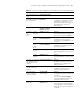
Note that the command level available to users logging into a switch through the
scheme authentication mode depends on the authentication-mode scheme
[ command-authentication ] command and the service-type terminal [ level
level ] command, as listed in Table 19.
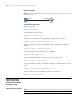
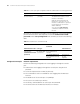
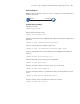
Configuration Example Network requirements
Perform the following configuration for users logging in through the Console
port:
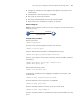
■ Configure the name of the local user to be “guest”.
■ Set the authentication password of the local user to 1234567890 (in plain
text).
■ Set the service type of the local user to Terminal, the available command level
of the user to 2.
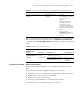
Set history command buffer size history-command
max-size value
Optional
The default history
command buffer size is
10. That is, a history
command buffer can
store up to 10
commands by default.
Set the timeout time for the user
interface
idle-timeout minutes
[ seconds ]
Optional
The default timeout
time of a user interface
is 10 minutes.
With the timeout time
being 10 minutes, the
connection to a user
interface is terminated if
no operation is
performed in the user
interface within 10
minutes.
You can use the
idle-timeout 0
command to disable the
timeout function.
Table 19 Determine the command level
Scenario
Command level
Authentication
mode User type Command
authentication-m
ode scheme
[ command-auth
orization ]
Users logging
into the
Console port
and pass
AAA&RADIUS
or local
authentication
The service-type terminal
[ level level ] command is not
configured.
Level 0
The default
command level
available for local
users is level 0.
The service-type terminal
[ level level ] command is
configured.
Determined by the
level argument
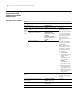
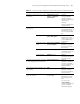
Table 18 Console port login configuration with the authentication mode being scheme
Operation Command Description