
3Com Switch 7750 Configuration Guide


472 CHAPTER 47: PIM CONFIGURATION
PIM-DM Configuration Perform the following configuration to configure PIM-DM. When the router runs
in PIM-DM domain, you are recommended to enable PIM-DM on all the interfaces
of non-boarder routers.
Configuring Filtering
Policies for Multicast
Source/Group
c
CAUTION:
■ If you configure basic ACLs, the source address match is performed on all the
received multicast packets. The packets failing to match are discarded.
■ If you configure advanced ACLs, the source address and group address match
is performed on all the received multicast packets. The packets failing to match
are discarded.
PIM-SM Configuration PIM-SM configuration includes:
Configuring Filtering
Policies for Multicast
Source/Group
For the configuration of filtering policies for multicast source/group, refer to
“PIM-DM Configuration” on page 472.
Configuring BSR/RP
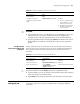
Table 377 Configure filtering policies for multicast source/group
Operation Command Description
Enter system view system-view -
Enable the multicast routing
protocol
multicast routing-enable Required
Enter PIM view pim -
Perform source/group filter on
the received multicast packets
source-policy acl-number Optional
You can configure to filter the
IP addresses of some multicast
groups in ACL.
Table 378 Configuration tasks
Operation Description Section
Configure filtering policies for
multicast sources/groups
Optional “Configuring Filtering Policies for Multicast
Source/Group” on page 472
Configure BSR/RP Optional “Configuring BSR/RP” on page 472
Configure PIM-SM domain
boundary
Optional “Configuring PIM-SM Domain Boundary”
on page 474
Filter the registration packets
from RP to DR
Optional “Filtering the Registration Packets from RP
to DR” on page 474
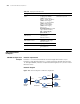
Table 379 Configure BSR/RP
Operation Command Description
Enter system view system-view -
Enable the multicast routing
protocol
multicast routing-enable Required
Enter PIM view pim -