
3Com Switch 7750 Configuration Guide



Console Port Login Configuration with Authentication Mode Being Scheme 47
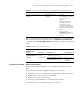
Configure to authenticate users locally
or remotely
authentication-mode
scheme [ command-
authorization ]
Required
The specified AAA
scheme determines
whether to authenticate
users locally or
remotely.
Users are authenticated
locally by default.
Configure the
Console port
Set the baud rate speed speed-value Optional
The default baud rate of
the AUX port (also the
Console port) is 9,600
bps.
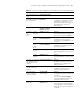
Set the check mode parity { even | mark |
none | odd | space }
Optional
By default, the check
mode of a Console port
is set to none, that is,
no check bit.
Set the flow control
mode
flow-control { hardware
| none | software }
Optional
By default, a Console
port does not perform
flow control.
Set the stop bits stopbits { 1 | 1.5 | 2 } Optional
The default stop bits of
a Console port is 1.
Set the data bits databits { 7 | 8 } Optional
The default data bits of
a Console port is 8.
Configure the command level available
to users logging into the user interface
user privilege level level Optional
By default, commands
of level 3 are available
to users logging into the
AUX user interface.
Make terminal services available to the
user interface
shell Optional
By default, terminal
services are available in
all user interfaces.
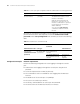
Set the maximum number of lines the
screen can contain
screen-length
screen-length
Op
tional
By default, the screen
can contain up to 24
lines.
You can use the
screen-length 0
command to disable the
function to display
information in pages.
Table 18 Console port login configuration with the authentication mode being scheme
Operation Command Description